Understanding SEO metrics is the difference between guessing whether your SEO efforts are working and actually knowing. When you're new to search engine optimization, the number of available metrics can feel overwhelming. This guide breaks down the essential metrics every beginner needs to understand, why each one matters, and how to interpret them correctly.
SEO is not a "set it and forget it" activity. Search engines constantly update their algorithms, competitors adjust their strategies, and user behavior shifts over time. Metrics give you a way to measure progress, identify problems early, and make informed decisions instead of relying on assumptions.
Without metrics, you can't tell whether a drop in visitors is temporary or a sign of a deeper technical issue. You also can't tell whether your content strategy is actually working or simply feels like it's working. Metrics remove the guesswork.
Organic traffic refers to visitors who land on your website through unpaid search engine results, as opposed to paid ads, social media, or direct visits. It's typically the first metric beginners look at because it directly reflects how visible your site is in search results.
A steady increase in organic traffic usually signals that your SEO efforts, whether content creation, technical fixes, or link building, are having a positive effect. A sudden drop can indicate anything from an algorithm update to a technical error, so this metric is best reviewed alongside others rather than in isolation.
Organic visibility measures how consistently your website appears across a defined set of relevant keywords, not just how you rank for one term. Where a single keyword ranking tells you about one search term, visibility gives you a broader picture of your overall presence in search results across your entire target keyword list.
This matters because a site can rank #1 for one keyword and be invisible for fifty related ones. Tracking visibility as its own metric helps you catch that gap early, rather than assuming strong performance on one term means strong performance everywhere. It works hand in hand with organic traffic, since rising visibility across your keyword set is usually what drives sustainable traffic growth over time.
Keyword rankings show where your pages appear in search results for specific search terms. Ranking on page one, and ideally within the top three to five positions, matters because the vast majority of clicks go to those top results.
It's important to track rankings for a defined list of target keywords rather than trying to monitor everything. Rankings can fluctuate daily due to factors outside your control, so beginners should focus on the overall trend over weeks and months rather than reacting to daily changes.
Average Position is the specific metric Google Search Console uses to report where your pages typically rank across all the search queries they appear for. It's calculated by summing the ranking position for every query a page appears in, then dividing by the total number of those queries.
A lower number means a stronger position, since position 1 is the top result and position 20 sits on page two. Average Position is most useful when tracked over time for a specific page or keyword group, rather than as a single snapshot, because it can shift day to day based on factors like seasonality or competitor changes. It's closely related to keyword rankings, but it specifically reflects Search Console's own aggregated calculation rather than a manual rank check.
Click-through rate measures the percentage of people who click on your page after seeing it in search results. It's calculated as:
CTR = (Clicks ÷ Impressions) × 100
For example, if your page received 40 clicks from 2,000 impressions, your CTR would be 2%.
A high ranking with a low CTR often points to an unappealing title tag or meta description. Since these elements act as your page's advertisement in search results, improving them can increase clicks even without changing your ranking position.
Impressions count how many times your page appeared in search results, regardless of whether it was clicked. This metric helps you understand your overall visibility for a keyword, even before anyone visits your site.
Rising impressions with flat or declining clicks usually means your page is being seen but isn't compelling enough to earn the click. This is a useful signal for prioritizing which title tags and meta descriptions need attention.
Bounce rate is the percentage of visitors who leave your site after viewing only one page, without taking further action. A high bounce rate can suggest that the page didn't match what the visitor was searching for, or that the page itself has usability issues.
However, bounce rate should be interpreted carefully. A blog post that fully answers a reader's question in one page may have a naturally higher bounce rate simply because the visitor got what they needed and left satisfied. Context matters more than the number alone.
Google Analytics 4 shifted its primary engagement metrics away from bounce rate and average session duration toward Engagement Rate and Engaged Sessions. An engaged session is one that lasts longer than 10 seconds, includes a conversion event, or includes two or more page views, giving a more accurate picture of genuine interest than raw time-on-site.
Average session duration can still provide useful context, particularly for understanding how long visitors spend with longer-form content, but it's no longer the primary engagement signal in GA4 reporting. Beginners should treat it as a supporting data point rather than a standalone measure of content quality.
Conversion rate measures the percentage of visitors who complete a desired action, such as filling out a form, signing up for a newsletter, or making a purchase. While traffic and rankings show visibility, conversion rate shows whether that visibility is translating into real value.
This is a critical metric because high traffic with a low conversion rate often signals a mismatch between the content, the audience, or the page design and what visitors actually need.
These are third-party scores, developed by SEO tools rather than Google, that estimate how likely a domain or page is to rank in search results based on factors like backlink profile and site history. Scores typically range from 1 to 100.
It's worth being clear on this distinction: Domain Authority and Page Authority are not metrics Google itself produces or uses in its ranking systems. They're proprietary estimates from third-party SEO tools, useful for comparing your site's relative strength against competitors, but they shouldn't be treated with the same weight as data coming directly from Google Search Console or Analytics.
Backlinks are links from other websites pointing to your site. They act as a signal of trust and authority, since a link is essentially one site vouching for another. The quality of backlinks matters far more than the quantity.
A small number of links from reputable, relevant websites typically provides more SEO value than a large number of links from low-quality or unrelated sites. Monitoring your backlink profile helps you understand your site's authority and identify any harmful links that may need to be addressed.
Core Web Vitals are a set of specific metrics Google uses to measure user experience, focusing on loading speed, interactivity, and visual stability. These include measurements for how quickly the main content loads, how responsive the page is to user input, and how much the layout shifts while loading.
Since Google has confirmed these metrics play a role in search rankings, they're worth understanding early on, even if the technical details become more relevant as your SEO knowledge grows.
Crawl errors occur when search engines are unable to access certain pages on your site, while indexing status shows whether a page has been added to the search engine's index at all. If a page isn't indexed, it cannot appear in search results, regardless of how well it's optimized.
Regularly checking for crawl errors and indexing issues helps catch technical problems before they significantly impact traffic.
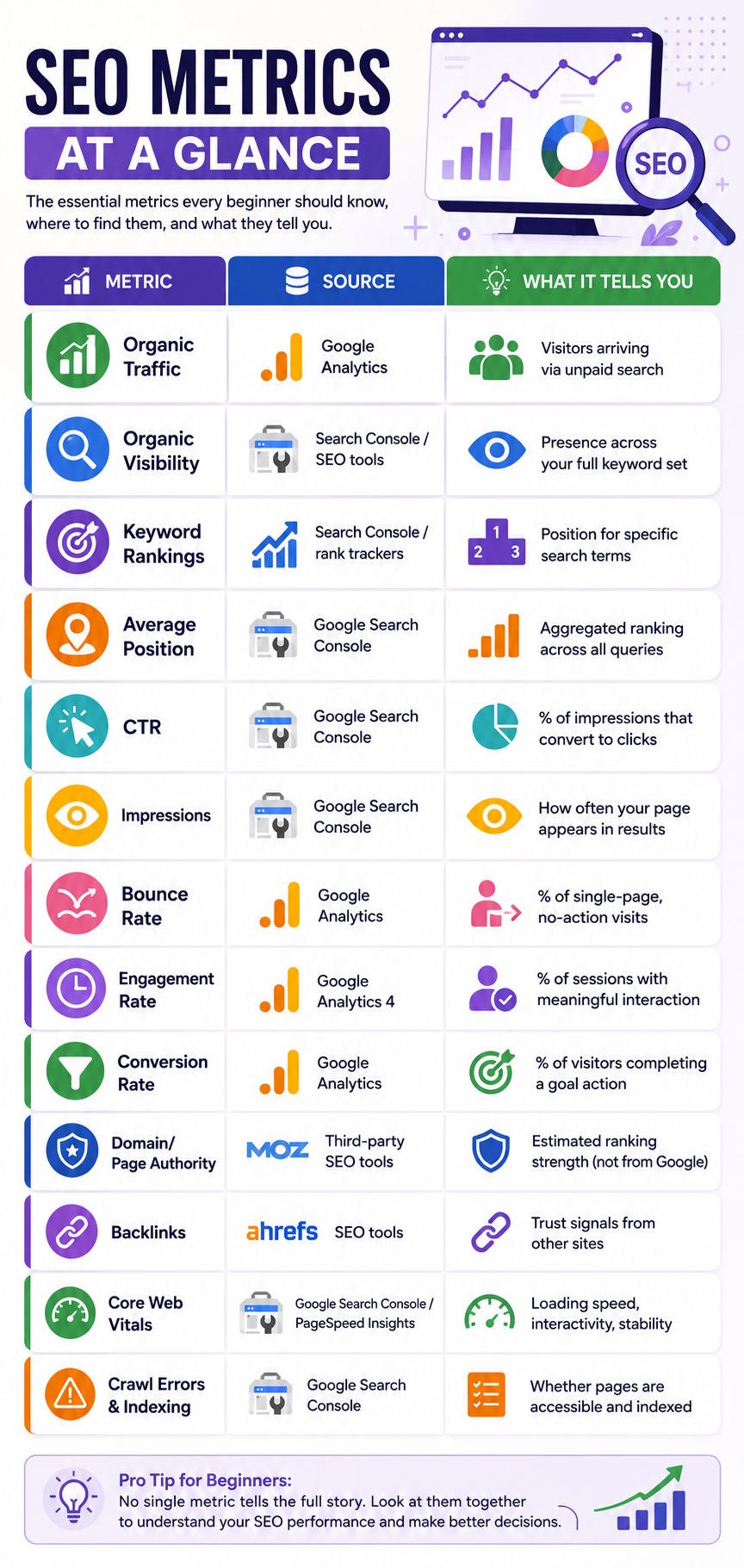
| Metric | Source | What It Tells You |
|---|---|---|
| Organic Traffic | Google Analytics | Visitors arriving via unpaid search |
| Organic Visibility | Search Console / SEO tools | Presence across your full keyword set |
| Keyword Rankings | Search Console / rank trackers | Position for specific search terms |
| Average Position | Google Search Console | Aggregated ranking across all queries |
| CTR | Google Search Console | % of impressions that convert to clicks |
| Impressions | Google Search Console | How often your page appears in results |
| Bounce Rate | Google Analytics | % of single-page, no-action visits |
| Engagement Rate | Google Analytics 4 | % of sessions with meaningful interaction |
| Conversion Rate | Google Analytics | % of visitors completing a goal action |
| Domain/Page Authority | Third-party SEO tools | Estimated ranking strength (not from Google) |
| Backlinks | SEO tools | Trust signals from other sites |
| Core Web Vitals | Google Search Console / PageSpeed | Loading speed, interactivity, stability |
| Crawl Errors & Indexing | Google Search Console | Whether pages are accessible and indexed |
No single metric tells the whole story. Organic traffic might rise while conversion rate falls. Rankings might improve while CTR stays flat. The goal is to look at these metrics together, understand how they relate to one another, and use that combined picture to guide decisions.
Start by tracking a small, focused set of metrics relevant to your goals rather than trying to monitor everything at once. As your understanding grows, you can expand into more detailed analysis and technical metrics.
To reinforce these concepts for readers, this article would benefit from:
- A comparison table (included above) summarizing each metric, its source, and what it measures.
- A funnel diagram showing the relationship between Impressions → CTR → Clicks → Conversions.
- A simple line chart mockup illustrating how Average Position and Organic Traffic typically move together over time.
SEO metrics exist to answer a simple question: is your website performing the way it should in search results? Organic traffic, organic visibility, keyword rankings, average position, CTR, impressions, bounce rate, engagement rate, conversion rate, authority scores, backlinks, Core Web Vitals, and indexing status each answer a different piece of that question. Understanding what each one measures, and more importantly, what it doesn't measure, gives beginners a solid foundation for making informed SEO decisions.
Get a free audit of your organic traffic, rankings, and technical health — and a clear plan for what to fix first.
Book Your Free Consultation